
Free SEO Guide · 5 steps
Free SEO Guide: How to Get Started and Improve Your Google Rankings
Want more customers from Google? Start here. It’s free.
You don’t need expensive SEO tools or technical knowledge to make your website better.
At Marbella SEO Agency, we bring 20+ years of experience in search. Here are five things you can do yourself to improve your website’s visibility.
- No signup.
- No sales pitch.
- Just practical advice.

Before you start: what you need
Set aside about an hour for the first pass. You need three things: access to your website (or to the person who manages it), a Google account, and a list of the services that bring you the most valuable customers. Work through the steps in order – each one builds on the previous one – and use the toolbox below to record what you find. Your progress is saved in your own browser only; nothing is sent to us.
1 Check If Google Can Find Your Website
Open Google and search:
site:yourwebsite.com
Replace this with your domain.
Can you see your homepage and important service pages?
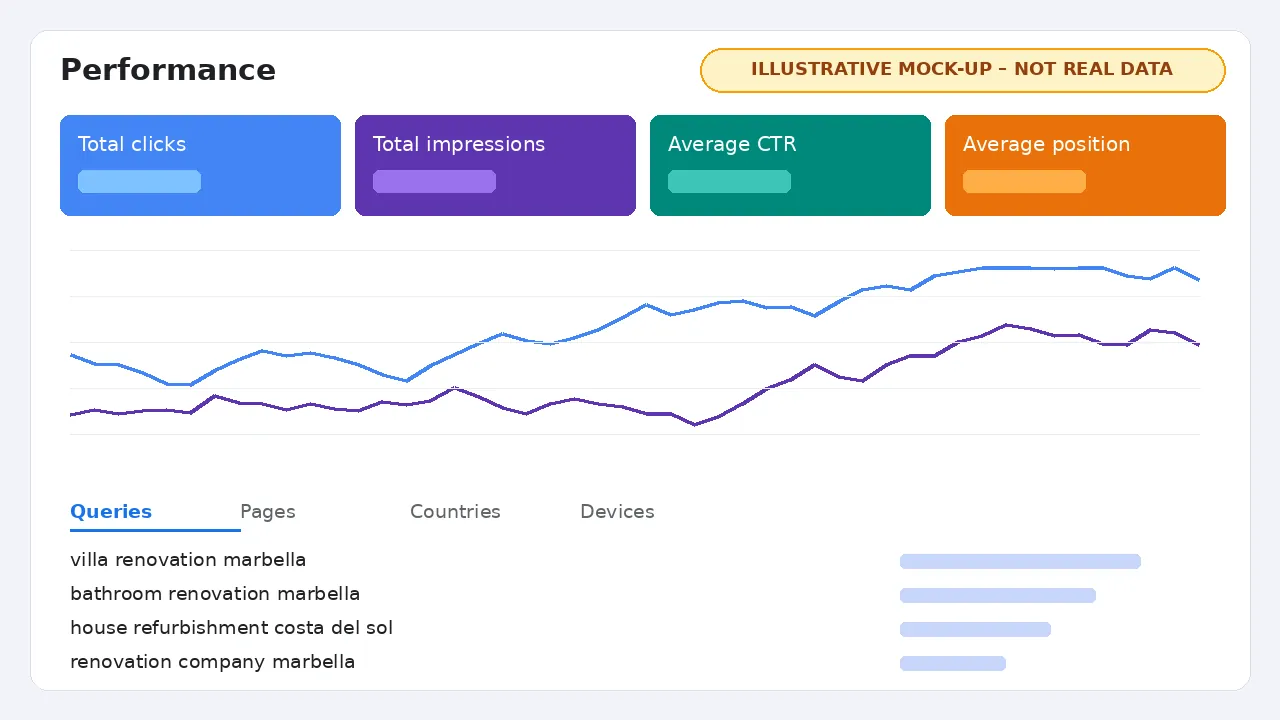
Next, set up Google Search Console. It’s free and shows which searches bring people to your website and whether Google has indexed your pages.
Your task: Check that your most important pages are indexed.
Go deeper
How to set up Search Console in 10 minutes
- Sign in to Search Console with your Google account and choose Add property.
- Pick Domain if you can edit your DNS (it covers http, https, www and non-www), or URL prefix if you can only add an HTML tag or upload a file.
- Verify ownership. On WordPress, many SEO plugins have a field for the verification code.
- Submit your XML sitemap under Sitemaps (often /sitemap.xml or /sitemap_index.xml).
- Wait a few days. Data starts to appear once Google has processed your site.
Check a single page with URL Inspection
Paste the address of your main service page into the search bar at the top of Search Console. It tells you whether the page is on Google, when it was last crawled, and which version Google treats as the main (canonical) one. If a page is not indexed, the report usually says why – for example “Excluded by noindex tag” or “Crawled – currently not indexed”.
Common reasons a page is missing
- A “noindex” setting left on after a redesign (in WordPress: Settings → Reading → Discourage search engines).
- The page is not linked from anywhere else on your site.
- Several near-identical pages compete, so Google picks only one.
- The site is brand new and simply has not been crawled yet.
2 Find Out What Customers Search For
Think about what someone would type into Google when looking for your services.
If you own a renovation company in Marbella, potential searches might include:
- Villa renovation Marbella
- Bathroom renovation Marbella
- House refurbishment Costa del Sol
Type your services into Google and look at the suggested searches.
Your task: Write down five searches that could bring you paying customers.
Go deeper
Understand search intent
Not every search is a sales opportunity. Sort your ideas into four groups:
- Commercial / transactional – “bathroom renovation Marbella”: the person wants a supplier. Highest priority.
- Informational – “how much does a bathroom renovation cost”: good for a helpful guide that links to your service page.
- Navigational – your brand name: make sure your homepage and Google Business Profile show up.
- Local – “near me” and town names: usually answered by Google Maps first.
Free places to find real searches
- Google autocomplete and the “People also ask” and “Related searches” boxes.
- Search Console → Performance → Queries, once you have data.
- Questions customers actually ask you by phone, email and WhatsApp.
- The languages your customers use. On the Costa del Sol that often means English and Spanish, and sometimes Swedish, German or Dutch.
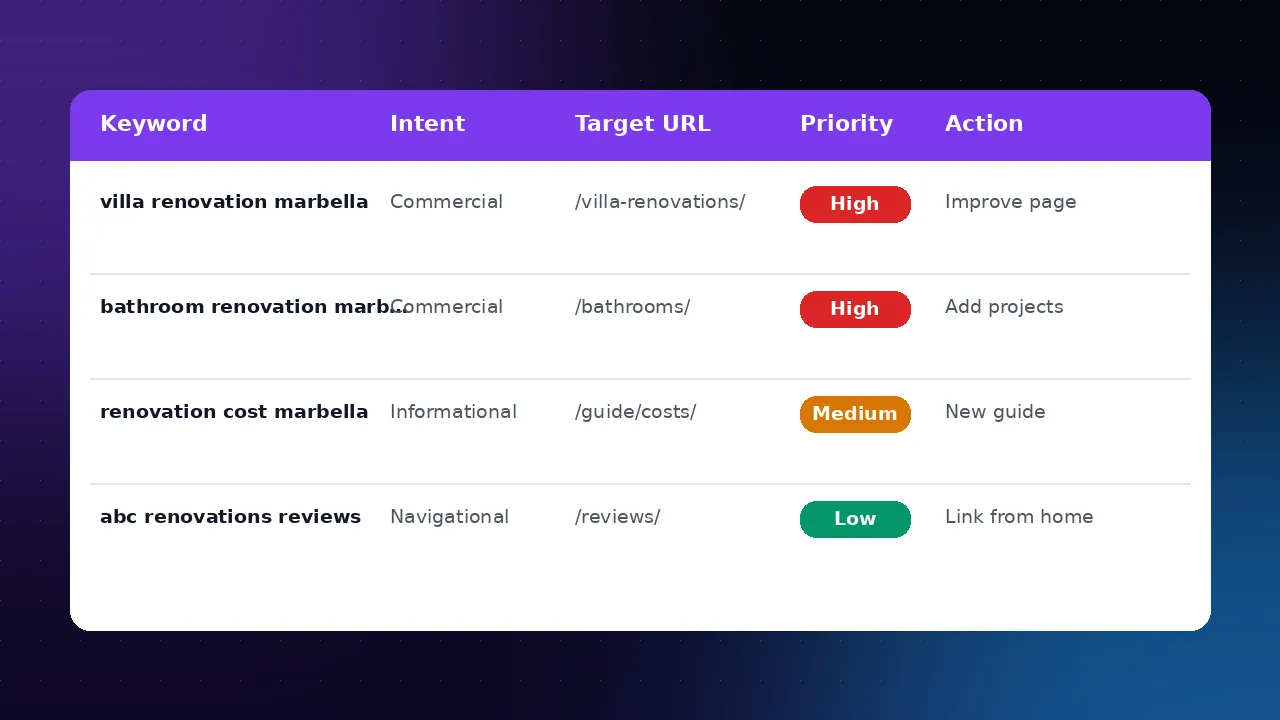
Record each search in the keyword worksheet with the page that should rank for it.
Keyword mistakes to avoid
- Chasing one big, vague term (“SEO”, “renovation”) instead of specific service + place searches.
- Targeting the same search with several pages.
- Using words customers never use (internal jargon or product codes).
3 Improve One Important Page
Choose the page describing your most valuable service.
Make sure it has:
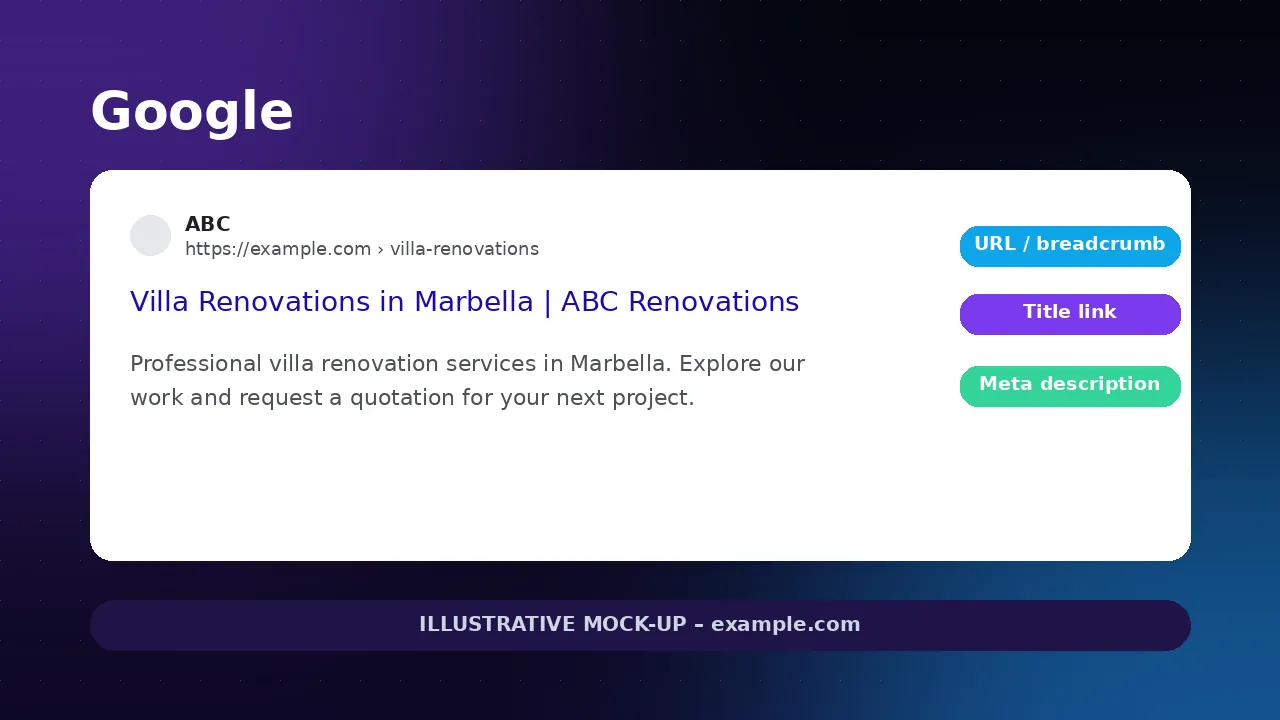
- A clear title explaining your service
- A heading that matches what customers need
- Useful information about what you offer
- Genuine photos or examples of your work
- An easy way to contact you
Avoid vague marketing phrases. Explain what you actually do.
Your task: Improve one page today instead of publishing five new ones.
Go deeper
A simple on-page checklist
- Title tag: service + place + brand, written for people. Test it in the snippet preview tool.
- One main heading (H1) that says what the page is about, then clear subheadings.
- Answer real questions: what is included, who it is for, areas you cover, typical timelines, how pricing works.
- Proof: project photos, short case examples, reviews and qualifications.
- Internal links from your homepage and related pages using descriptive words, not “click here”.
- Contact: phone, WhatsApp or a short form visible without hunting.
Quick technical checks
- Open the page on your phone. Is the text readable without zooming and are buttons easy to tap?
- Run the page through Google’s free PageSpeed Insights. Large uncompressed images are the most common cause of slow pages.
- Check that the page uses https and that there is only one version of it (no duplicates with and without www).
Want to go further? Read about on-page SEO and technical SEO.
What usually holds a service page back
- Thin text that could describe any company in any town.
- Stock photos only, with no evidence of real work.
- A title like “Home” or “Services”.
- The contact details are only in the footer.
4 Improve Your Google Maps Presence
If your business is eligible, claim or update your free Google Business Profile.
Check your business category, contact details, opening hours and services.
Add genuine photos and encourage customers to leave honest reviews.
Your task: Make sure your business information is complete and accurate.
Go deeper
Profile details that matter
- Primary category: the most specific category that describes your main business. Add secondary categories only where they are true.
- Name, address and phone exactly as they appear on your website and signage. Do not add keywords to your business name.
- Services and service areas that match what your website says.
- Photos of your premises, team and work, added regularly.
- Reviews: ask after a job well done and reply to every review politely, including critical ones. Never buy or filter reviews.
Local rankings depend on relevance, distance and prominence, so a good profile helps but cannot guarantee a position. More on local SEO in Marbella.
Google Maps pitfalls
- Two profiles for the same business.
- Using a virtual office address where you do not meet customers.
- Opening hours that are wrong on public holidays.
5 See What’s Working
Return to Google Search Console after making your improvements.
Look at which searches display your website and which pages receive clicks.
Keep track of enquiries, not just rankings.
SEO takes time, so don’t expect instant results. Small, useful improvements are a good place to start.
Your task: Review your progress monthly and decide what to improve next.
Go deeper
A 20-minute monthly review
- In Search Console, open Performance and compare the last 28 days with the previous period.
- Filter by the page you improved in step 3. Are impressions and clicks moving?
- Look for searches with many impressions but few clicks – a better title or description may help.
- Check Pages (indexing) for new errors.
- Count real enquiries: calls, forms, WhatsApp messages and bookings. Ask new customers how they found you.
- Pick one improvement for next month and write it down.
Make enquiries measurable
Rankings are only a means to an end. Make sure form submissions, click-to-call and WhatsApp clicks are recorded – for example as key events in Google Analytics 4 – so you can see which pages actually bring customers.
Free SEO Toolbox
Three simple tools to put this guide into practice. They run entirely in your browser, save your progress on this device and never ask for your email.
Interactive SEO checklist
Tick each task as you complete it. Your progress is saved in this browser.
SEO title & meta description preview
Write a title and description and see roughly how they could look in Google.
Google may rewrite titles and descriptions. Display length varies by device and search query; character counts are guidance, not fixed limits.
Keyword worksheet
Plan one target page and one next action per search. Edit any cell; copy to Excel or Google Sheets, or download a CSV.
| Keyword | Search Intent | Target URL | Priority | Action Required |
|---|
Your Free SEO Checklist
- Check your website in Google
- Set up Google Search Console
- Find five relevant keywords
- Improve your most important service page
- Update your Google Business Profile
- Review your results next month
Want the full 12-step version with progress tracking? Use the interactive checklist.
Common Questions About Doing SEO Yourself
Can I really do SEO myself for free?
Yes, the basics. Search Console, Google Business Profile, PageSpeed Insights and Google itself are free. Many small businesses improve visibility by fixing indexing problems, improving one key page and keeping their Business Profile accurate. Professional help becomes useful when competition, technical issues or several languages make things more complex.
How long does SEO take to work?
It depends on your website, competition and the changes you make. Simple fixes, such as an indexing problem, can show within days or weeks once Google recrawls the page. Competitive searches usually take several months of steady work. That is why this guide recommends a monthly review.
Do I need to publish a blog?
Not necessarily. For most local businesses the first priority is clear, useful service pages. Add articles when they answer real customer questions and link to the relevant service.
Is Google Search Console the same as Google Analytics?
No. Search Console shows how your site performs in Google Search – searches, impressions, clicks and indexing. Analytics shows what visitors do on your website after they arrive. Using both gives the clearest picture.
Why does Google show a different title from the one I wrote?
Google may rewrite titles and descriptions when it thinks another text better matches the search. Clear, accurate and specific titles are rewritten less often, but there is no guarantee.
Need a Little Help?
These five steps are a great starting point, but SEO can become more complicated as your business grows.
At Marbella SEO Agency, we help businesses improve their Google visibility through technical SEO, local SEO, content optimisation and international search strategies.
We’ve been working in search for 20+ years, and we believe good advice should be accessible to everyone.
Ready to take the next step?
Request an SEO review
Request an SEO review
Or explore our SEO services to see how we can help your business grow.
Prefer WhatsApp? Chat with us · Contact Marbella SEO Agency